How To Add Appraisals To Your Write Up Form
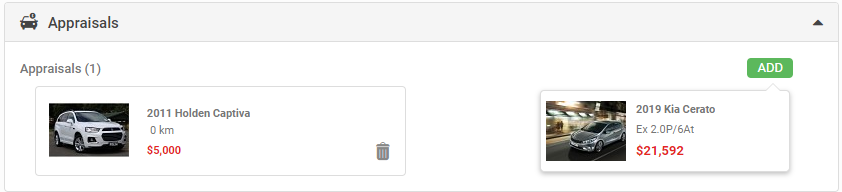
- The Appraisals section of the Write Up Form allows you to select any Appraisal completed on the Lead by clicking on the 'ADD' button.
- Note - If the Dealer utilises the Vehicle Appraisal Manager Approval role then only the Approved Appraisals can be added to Write Ups.
- You can add multiple Appraisals which will be summed, and added to the 'Appraisals' field in the Summary section.
Related Articles
How To Complete A Write Up Form
In AutoPlayAuto.com you can create Write Up Forms from your leads. A Write Up Form can be created from the + icon in the grey action menu, or by clicking on the green 'ADD' button in the Write Ups section. The Write Up Form requires the Write Up ...
Overview - Write Ups
The Write Up Form within AutoPlayAuto.com can be used as a fantastic tool to help negotiation with your customers. Check out the video below to find out more about creating Write Up Forms within AutoPlayAuto.com. To find out more detail about Write ...
Creating Leads From Appraisals
Shortcut To Create Lead From Appraisals Dashboard (SPW-3519) In 20.10.1 we've added a shortcut to the Vehicle Appraisals Dashboard. Under the + button you will now see a 'Add New Lead With Appraisal' option if you have the Manage Leads role. If you ...
Manager Approval For Trade Ins/Appraisals
If the Vehicle Appraisal Manager Approval Role (VAMA) is enabled it will be possible for Managers to mark Appraisals as Approved. Any user ticked as a manager in the VAMA role will be able to mark Appraisal Forms as approved. Adding Appraisals to a ...
How To Add Accessories To A Write Up Form
You can add accessories to each listing on the Write Up via the 'ADD' button. The sum of the accessories is calculated in the 'Total' field in this section, and added to your Write Up. To remove an Accessory click on the rubbish bin icon. In ...